
Stop CNC Vacuum Loss: Becker Pump Maintenance Guide
Losing parts on your CNC router? Discover why Becker vacuum pumps lose suction and how routine maintenance can save your production schedule.
During a high-output shift on a busy shop floor, a nested routing run on a premium sheet of double-sided melamine can quickly go wrong. When a high-frequency chatter suddenly rings out, it signals that the material is shifting under lateral tool pressure. Within seconds, a $200 sheet of material becomes scrap, a $60 solid carbide compression bit snaps, and the day’s production schedule grinds to a costly halt.
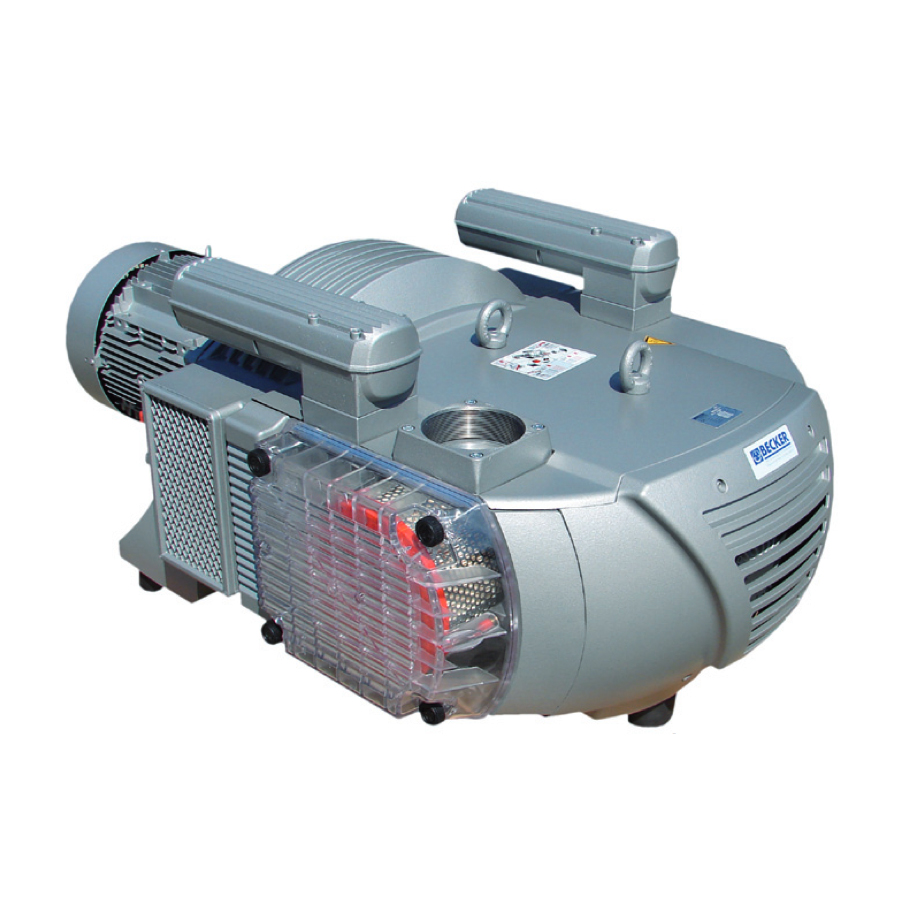
When parts start sliding on your CNC router table, your first instinct might be to blame the spoilboard flycutting prep or the gasket tape. But more often than not, the true culprit is humming away quietly (or struggling loudly) under your machine: your Becker vacuum pump.
Industrial CNC routers from top-tier builders like MultiCam, DMS, Thermwood, Quintax, Front Range, and Motionmaster rely entirely on the unrelenting hold-down power of Becker rotary vane pumps. When that suction drops, your shop’s productivity and profit margins drop with it. Let’s look at why these industrial workhorses lose their pull, how to diagnose them, and how to fix them before a catastrophic failure strikes.
The Diagnosis: 4 Reasons Your Becker Pump is Losing Vacuum
When vacuum pressure starts dropping below your usual baseline (typically 18 to 22 in Hg for a healthy dry system), it is rarely a sudden mystery. It almost always traces back to these four common maintenance oversights:
Choked Intake Filters
CNC environments are inherently dusty. If your intake filter canister is clogged with MDF dust, melamine chips, or plastic particulates, the vacuum pump has to work twice as hard. This starves the system of CFM, spikes internal operating temperatures, and strains the motor.
Worn or Chipped Carbon Vanes
These pumps rely on self-lubricating graphite vanes to maintain a tight vacuum seal. Over time, these vanes wear down. Operating past their wear limit causes them to misalign in their slots, drop suction, or shatter, which can score the cylinder wall and ruin the rotor.
Grease Starvation in Bearings
Bearings require highly specific, high-temperature synthetic grease at strict operating hour intervals. Neglecting routine lubrication leads to excessive friction, severe heat buildup, and premature bearing failure, which can cause the rotor to seize up and lock.
Leaky Valves & Degraded Gaskets
High operating temperatures and constant pressure fatigue degrade rubber gaskets and warp delicate exhaust valve flaps. When these seals fail, pressurized air bypasses the vacuum chamber and leaks back into the system, reducing your hold-down performance.
SAFETY FIRST: LOCK-OUT/TAG-OUT (LOTO) REQUIRED
Before performing any inspection, filter changes, or housing removal on your Becker vacuum pump, you MUST completely isolate the machinery from its power source. Turn off the main breaker to the vacuum pump control panel and execute standard Lock-Out/Tag-Out (LOTO) procedures. Becker pumps operate under extreme thermal conditions and contain high-voltage electrical connections and high-speed internal rotating components. Never service a pump that is hot to the touch or actively energized.
The Solution: DIY Inspections & Essential Replacement Parts
Fortunately, routine preventative maintenance is highly manageable for an in-house maintenance team. To keep your pump running efficiently and extend its service life, implement this simple checklist:
Blow Out Filters Weekly, Replace Monthly
Don’t just shake out the paper element. Inspect it with a work light for micro-tears. Stock up on replacement intake filter cartridges from CNC Parts Dept., Inc. to ensure your pump always breathes clean air.
Measure Your Vanes Every 2,000 Hours
Remove the side housing cover (after performing LOTO!) and slide out a carbon vane. Measure its width against the factory minimum spec sheet. If they are worn near the limit or showing hairline cracks, swap them out immediately using our premium Becker Carbon Vane Kits.
Purge and Grease
If your Becker pump has grease fittings (such as the VTLF series), use the factory-approved high-temperature grease every 200 operating hours. Do not over-grease, as excess can migrate into the vacuum chamber and ruin your carbon vanes.
Need replacement filters, genuine vanes, or specialized high-temp grease? Browse our full selection of Becker genuine parts in our shop.
When to Call the Pros: Expert Becker Rebuilds
Internal tolerance adjustments, bearing press-fits, rotor alignment, and complete pump rebuilds require specialized industrial tools, dial indicators, and precision engineering. Misaligning a rotor by even a fraction of a millimeter during a DIY rebuild can permanently score the cylinder wall, turning a repairable pump into a heavy piece of scrap metal.
If your Becker pump is tired, overheating, or completely seized, don’t risk your production timeline. CNC Parts Dept., Inc. offers dedicated, factory-grade Becker Vacuum Pump Maintenance Services. Our highly trained field technicians can come directly to your shop floor for on-site diagnostics and maintenance.
Beyond the Vacuum: Transform Your Machine with a Fagor Retrofit
While we are resolving your vacuum issues, we can also evaluate your entire CNC operation. If your older Motionmaster, DMS, MultiCam, or Thermwood is struggling with more than just vacuum loss—such as drifted axes, faulty servo drives, or an obsolete controller that relies on floppy disks—it might be time to discuss a Fagor Automation Retrofit.
Upgrading your legacy control system to a modern Fagor 8060 or 8065 CNC system alongside a freshly rebuilt vacuum system will make your vintage machine run faster, tighter, and more reliably than the day it was built. By pairing a robust hold-down system with a state-of-the-art controller, you protect your business against obsolescence and unlock performance capabilities that rival brand-new machinery.
Don’t wait for a thrown part to ruin your week. Visit our dedicated Becker Vacuum Pump Maintenance Service Page today to book a technician, or contact our support team to get your questions answered by a CNC router specialist!